
PS Remote Play for WindowsWindows 10 (64-bit) or Windows 11
SHA-256 not published
Stream games from your PS5 or PS4. Pick a device to get the PlayStation app or a compatible client, then open its download and setup steps.
The file stays on your device. This check uploads 0%.
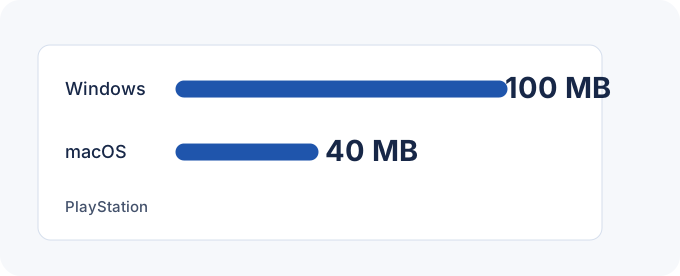
SHA-256 not published64-bit Windows 10 or Windows 11 · 7th-generation Intel Core or later · 2 GB RAM · 100 MB free · 1024 × 768 minimum display.
Monterey, Ventura, Sonoma, Sequoia or Tahoe · 2 GB RAM · 40 MB free for the Sony app.
Choose the Chiaki-ng Flatpak or the AppImage for your CPU. Chiaki-ng requires Vulkan 1.2 or later.
iOS 16 or iPadOS 16 minimum. Grant local network access the first time you connect at home.
Android 11 or later. DualSense requires Android 12, and DualSense Edge requires Android 14.
Requires a compatible Android TV OS 12+ device, such as a supported Chromecast or Google TV Streamer.
chiaki-ng-win_arm64-MSYS2-installer.exechiaki-ng-win_arm64-MSYS2-portable-1.10.1.zipchiaki-ng-win_x64-MSYS2-installer.exechiaki-ng-win_x64-MSYS2-portable-1.10.1.zipSmoovPlay-Setup.exechiaki-ng-macos_arm64-Release.dmgchiaki-ng.AppImage_arm64chiaki-ng.AppImage_x86_64Check the rules for your client and the console that hosts the stream.
For a manual rule, reserve the console’s local IP first. If your provider uses CGNAT, a router rule alone cannot reach the console.
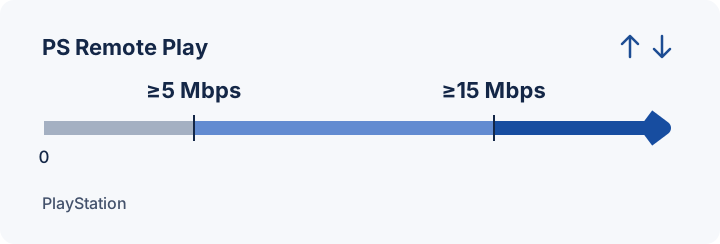
Estimate video payload for a sustained bitrate. Audio and network overhead add to the total.
Open the Sony installer or store listing for your device. On Steam Deck, use the Chiaki-ng Flatpak in Desktop Mode.
Enable Remote Play, then sign in with the same account on your device and console. Enable network wake before leaving the PS5 or PS4 in Rest Mode.
Launch a compatible game on the console. Check your controller and picture over the same network before trying from elsewhere.
| Client | Role | Requirements |
|---|---|---|
| PS Remote Play 9.5.0 | Sony client | Windows, Mac, iPhone, iPad, Android and supported TVs. Start here with a PlayStation controller or mobile touch controls. |
| Chiaki-ng v1.10.1 | Open-source client | Windows, Apple Silicon and Linux. Choose it for Steam Deck or configurable controls. |
| PXPlay | Commercial client | Includes Apple TV and Android TV. Check what your specific platform supports before buying. |
| SmoovPlay v0.3.3 | Frame-generation tool | Processes an existing stream on an RTX Windows PC. Input and console pairing stay with the original client. |
Prepare the PS5 that runs the game.
Choose an installer and pair your console.
See the GPU, RAM and storage requirements for frame generation.
Pair PS5 or PS4 and check keyboard, controller and router settings.
Find a client that fits your device and controls.
Start with the failure you can reproduce.
Sony lists stability improvements for the Windows and Mac update.
Choose from Windows installers and portable builds, an Apple Silicon DMG, and Linux AppImages.
The release includes updater and frame-pacing fixes.
Sony provides its Remote Play app for free. You need a compatible game and a supported console to run it. PXPlay is a separate commercial client.
Choose Android and open the PlayStation Mobile Inc. Google Play listing for com.playstation.remoteplay. The current phone listing requires Android 11 or later. Android TV uses a separate supported-device path.
Remote Play sends the picture and controls to and from a PS5 or PS4 that runs the game. PlayStation Portal uses PS5 for console Remote Play. PS Vita and PS TV use PS4 Link.
Games that require PS VR2, PS VR or PlayStation Camera cannot use Remote Play. Pause Share Play, disc playback and cloud streaming on the console before starting a session.